Calendar:Day template tag
The Calendar:Day tag handles "day-based" formatting and displays an event list for a specified date, or today's date.
For performance reasons, please be sure to update any Calendar template tags to use the channel="my_channel|my_other_channel" parameter, similar to how you would do it for {exp:channel:entries}. The demo templates don't include this by default since there's no automated way of knowing which channel(s) you're using.
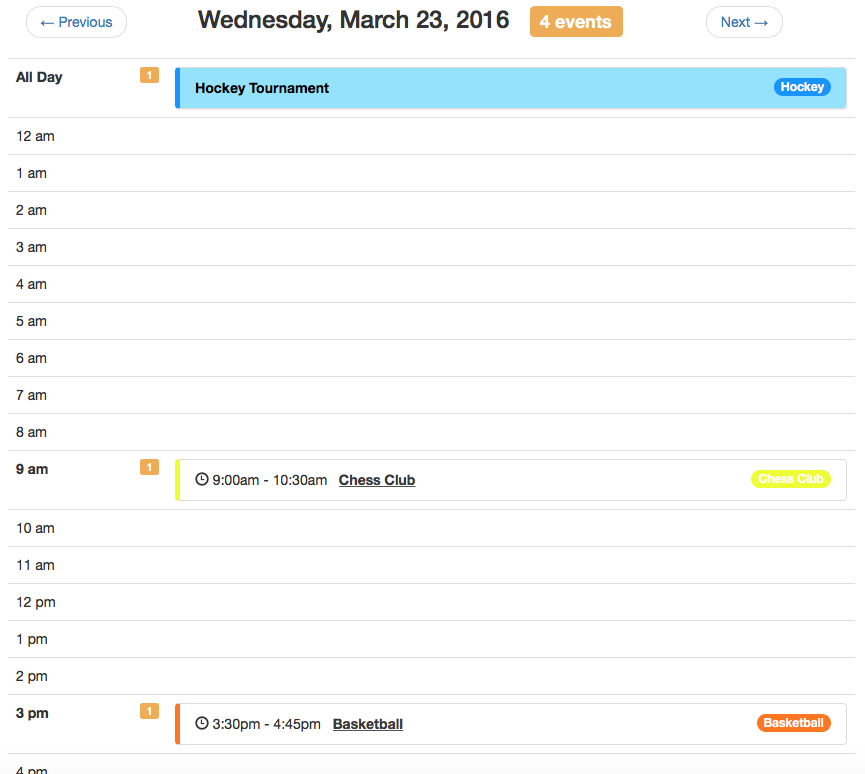
{exp:calendar:day} content {/exp:calendar:day}
Parameters
author_id
This parameter allows you to filter down the event results by the author of the Calendar event entries. You can hardcode a member ID, pass it through an embed, or grab it from the URI. You can also use CURRENT_USER to display event entries for the currently logged in user. Separate multiples with the pipe character. E.g. author_id="1", author_id="1|5|9" or author_id="CURRENT_USER".
calendar_id
This parameter allows you to display specific calendars by specifying their ID(s). You can hardcode a calendar ID, pass it through an embed, or grab it from the URI. Separate multiples with the pipe character. E.g. calendar_id="3" or calendar_id="1|3".
calendar_short_name
This parameter allows you to display specific calendars by specifying their short names. You can hardcode a short name, pass it through an embed, or grab it from the URI. Separate multiples with the pipe character. E.g. calendar_short_name="dodgeball" or calendar_short_name="soccer|baseball|dodgeball".
category
This parameter allows you to filter down the event results by the category ID assigned to calendar event entries. You can hardcode a category ID, pass it through an embed, or grab it from the URI. Separate multiples with the pipe character. E.g. category="22" or category="22|25|32".
channel
This parameter allows you to filter down the event results by the channel of the calendar event entries. You can hardcode a channel short name, pass it through an embed, or grab it from the URI. Separate multiples with the pipe character. E.g. channel="baseball" or channel="baseball|hockey|chess".
date_range_start
This parameter allows you to specify a particular day to display events for. If this parameter is NOT specified or an incorrect date value is passed to this parameter, the current day will be displayed. Both standard and easy-to-use text date formatting apply to this parameter.
{if segment_3}
  date_range_start="{segment_3}-{segment_4}-{segment_5}"
{if:else}
  date_range_start="today"
{/if}
site
If using EE Multiple Site Manager (MSM), you can specify a site short name(s) in this parameter to filter event entries down to that site. E.g. site="siteB" or site="siteA|siteB|siteC".
status
This parameter allows you to filter down the event results by the status of the calendar event entries. You can hardcode a channel short name, pass it through an embed, or grab it from the URI. Separate multiples with the pipe character. E.g. status="open" or status="open|extra".
Variables
Most of the variables listed in Calendar:Events are available for use here (inside of the calendar:events variable pair). Additionally, the following variables are available for use as well:
{calendar:next_day}
This variable displays the day after the currently viewed day. Typically used for linking to next day. E.g. {calendar:next_day format="%F %j, %Y"}
Available only OUTSIDE of the calendar:events variable pair.
{calendar:previous_week}
This variable displays the day before the currently viewed day. Typically used for linking to previous day. E.g. {calendar:previous_day format="%F %j, %Y"}
Available only OUTSIDE of the calendar:events variable pair.
{calendar:day_date}
This variable displays the date of the currently specified day. E.g. {calendar:day_date format="%j"}.
Can be used within the calendar:days variable pair and OUTSIDE of the calendar:events variable pair.
{calendar:day_total_events}
This variable displays the total number of events that are happening for a given day.
Can be used within the calendar:days variable pair and OUTSIDE of the calendar:events variable pair.
{calendar:hour_date}
This variable displays the date of the currently specified hour. E.g. {calendar:hour_date format="%g %a"}.
Can be used within the calendar:hours variable pair and OUTSIDE of the calendar:events variable pair.
{calendar:hour_total_events}
This variable displays the total number of events that are happening for a given hour.
Can be used within the calendar:hours variable pair and OUTSIDE of the calendar:events variable pair.
{calendar:all_day_total_events}
This variable displays the total number of all day events (all day or multi-day events).
Can be used within the calendar:all_day_events variable pair and OUTSIDE of the calendar:events variable pair.
Variable Pairs
{calendar:hours}
This variable pair handles the formatting for each hour of the day. It is available to use in the event you want to break down the list of results by sections of hours.
This variable pair will exclude all day and some multi-day (ones that started previous day) events. To display these, use the calendar:all_day_events variable pair.
{calendar:all_day_events}
This variable pair handles the formatting for events that are all day or multi-day (ones that started previous day). It will only display its contents if there are any events of this type for the given day.
{calendar:events}
This variable pair handles the formatting of each event result. Most of the variables listed in Calendar:Events are available for use here, prefixed with calendar:.
Conditionals
{calendar:no_results}
This conditional displays its contents when there is no event results for the given parameters.
Available only within the calendar:events variable pair.
{if calendar:no_results}
  Sorry, no events exist for the specified parameters.
{/if}
{calendar:events_truncated}New in 5.0.6+
This Boolean variable is true when Calendar stops processing event occurrences after reaching the tag's limit. It prevents an unusually large number of recurring event occurrences from exhausting PHP memory while rendering the calendar.
The default limit is 1000. When this variable is true, the displayed calendar may not include every matching event occurrence. Increase the tag's limit only where the server has sufficient memory to process the additional events.
Available only OUTSIDE of the calendar:events variable pair.
For example, display a notice when Calendar reaches the result limit:
{if calendar:events_truncated}
  <p class="calendar-notice">
    Some calendar events are not displayed because the result limit was reached.
  </p>
{/if}
{calendar:event_all_day}
This conditional will displays its contents if the event is an all day event. E.g. {if calendar:event_all_day}{/if}.
Available only within the calendar:events variable pair.
{calendar:event_multi_day}
This conditional will displays its contents the event occurs on multiple days. E.g. {if calendar:event_multi_day}{/if}.
Available only within the calendar:events variable pair.
{calendar:event_recurs}
This conditional will displays its contents if the event has recurrence rules. E.g. {if calendar:event_recurs}{/if}.
Available only within the calendar:events variable pair.
{calendar:day_is_weekend}
This conditional is typically used for adjusting styles or formatting, and will display its contents if the day occurs on the weekend (Saturday or Sunday). E.g. {if calendar:day_is_weekend}{/if}.
Available only OUTSIDE of the calendar:events variable pair.
{calendar:day_is_weekday}
This conditional is typically used for adjusting styles or formatting, and will display its contents if the day occurs on a weekday (Monday to Friday). E.g. {if calendar:day_is_weekday}{/if}.
Available only OUTSIDE of the calendar:events variable pair.
{calendar:current_day}
This conditional will displays its contents if the day is in the current day / today. E.g. {if calendar:current_day}{/if}.
Available only OUTSIDE of the calendar:events variable pair.
{calendar:current_week}
This conditional will displays its contents if the day is in the current week. E.g. {if calendar:current_week}{/if}.
Available only OUTSIDE of the calendar:events variable pair.
{calendar:current_month}
This conditional will displays its contents if the day is in the current month. E.g. {if calendar:current_month}{/if}.
Available only OUTSIDE of the calendar:events variable pair.
{calendar:current_year}
This conditional will displays its contents if the day is in the current year. E.g. {if calendar:current_year}{/if}.
Available only OUTSIDE of the calendar:events variable pair.
Examples
We strongly recommend you install the Demo Templates included with Calendar to see a more real-world, ready-to-go example that should work instantly with your site event data.
Below is a basic code example showing how this tag works:
{exp:calendar:day
  {if segment_3} {!-- Are we looking at a date other than today? --}
    date_range_start="{segment_3}-{segment_4}-{segment_5}"
  {if:else} {!-- Or are we looking at today's date? --}
    date_range_start="today"
  {/if}
}
  <p>
    <a href="{path='calendar/day'}/{calendar:previous_day format='%Y/%m/%d'}/">Previous Day</a>
    <b>{calendar:day_date format="%l, %F %j, %Y"}</b> ({calendar:day_total_events} events)
    <a href="{path='calendar/day'}/{calendar:next_day format='%Y/%m/%d'}/">Next Day</a>
  </p>
  {calendar:all_day_events}
    <ul>
      {calendar:events}
        <li>
          <a href="{path='calendar/events'}/{calendar:url_title}/">{calendar:title}</a> (all day)
        </li>
      {/calendar:events}
    </ul>
  {/calendar:all_day_events}
  {calendar:hours}
    <h4>{calendar:hour_date format="%g %a"}</h4>
    {calendar:events}
      <h3>
        <a href="{path='calendar/events'}/{calendar:url_title}/">{calendar:title}</a>
      </h3>
      <p>Calendar: {calendar:calendar_short_name}</p>
      <p>
        From {calendar:event_start_date format="%l, %F %j, %Y - %g:%i%a"} to
        {calendar:event_end_date format="%l, %F %j, %Y - %g:%i%a"}
      </p>
      {if calendar:no_results}
        <p>No events today.</p>
      {/if}
    {/calendar:events}
  {/calendar:hours}
{/exp:calendar:day}