Overview


Generate smarter text and images directly in Craft CMS with flexible custom prompts and support for multiple AI models. Built to fit naturally into your content workflow, it helps you create, refine, and iterate without leaving the editor.

Available AI Providers






AI for Everyday Content Tasks
Handle your everyday content tasks faster with built-in AI tools across Craft.
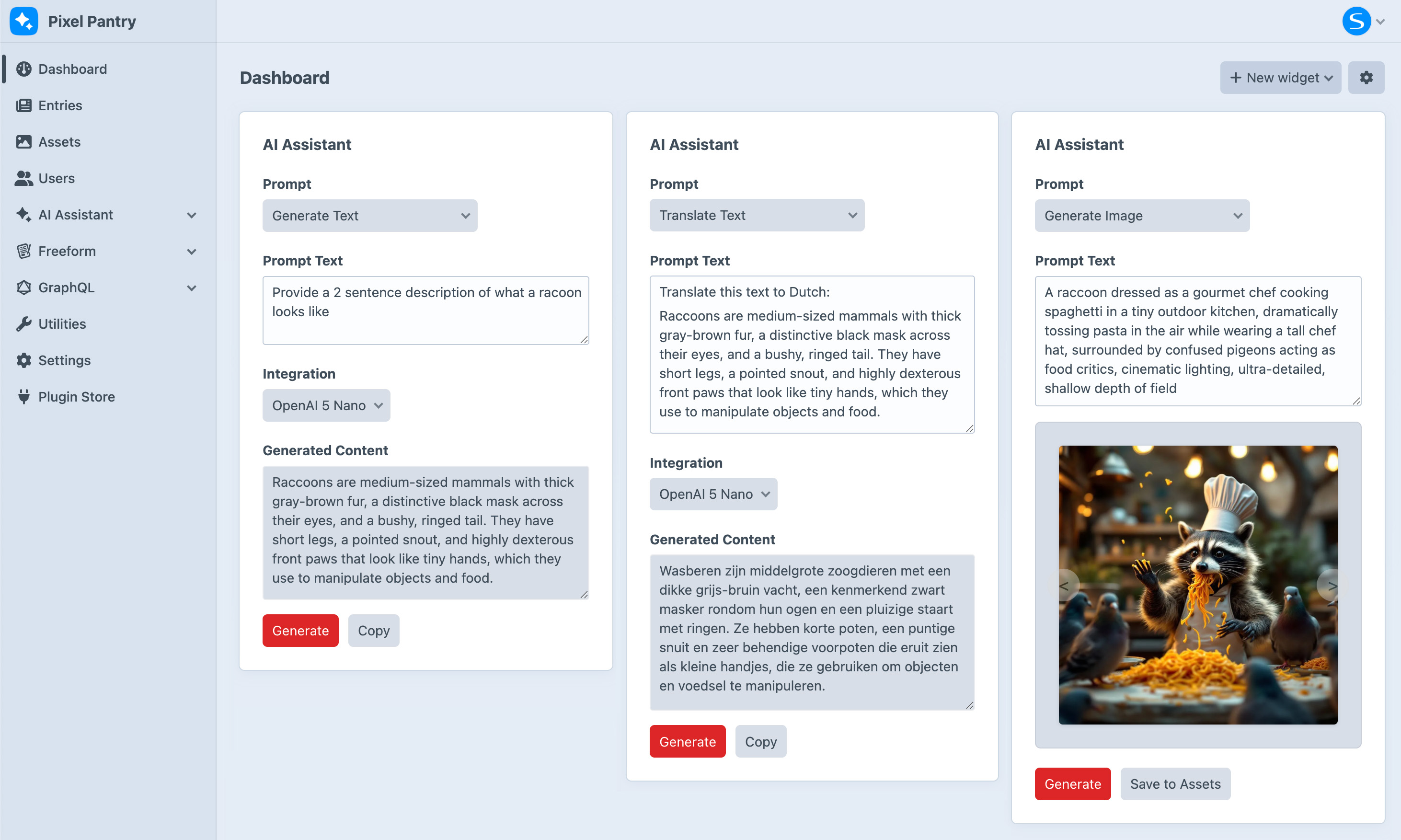
 Generate Text
 - Create high-quality content instantly for fields. Learn more
 Improve Content
 - Refine existing text to be clearer, more engaging, and on-brand.
 Translate
 - Quickly translate content into other languages with minimal effort.
 Create Images
 - Generate detailed, high-quality images from a prompt or existing content. Learn more
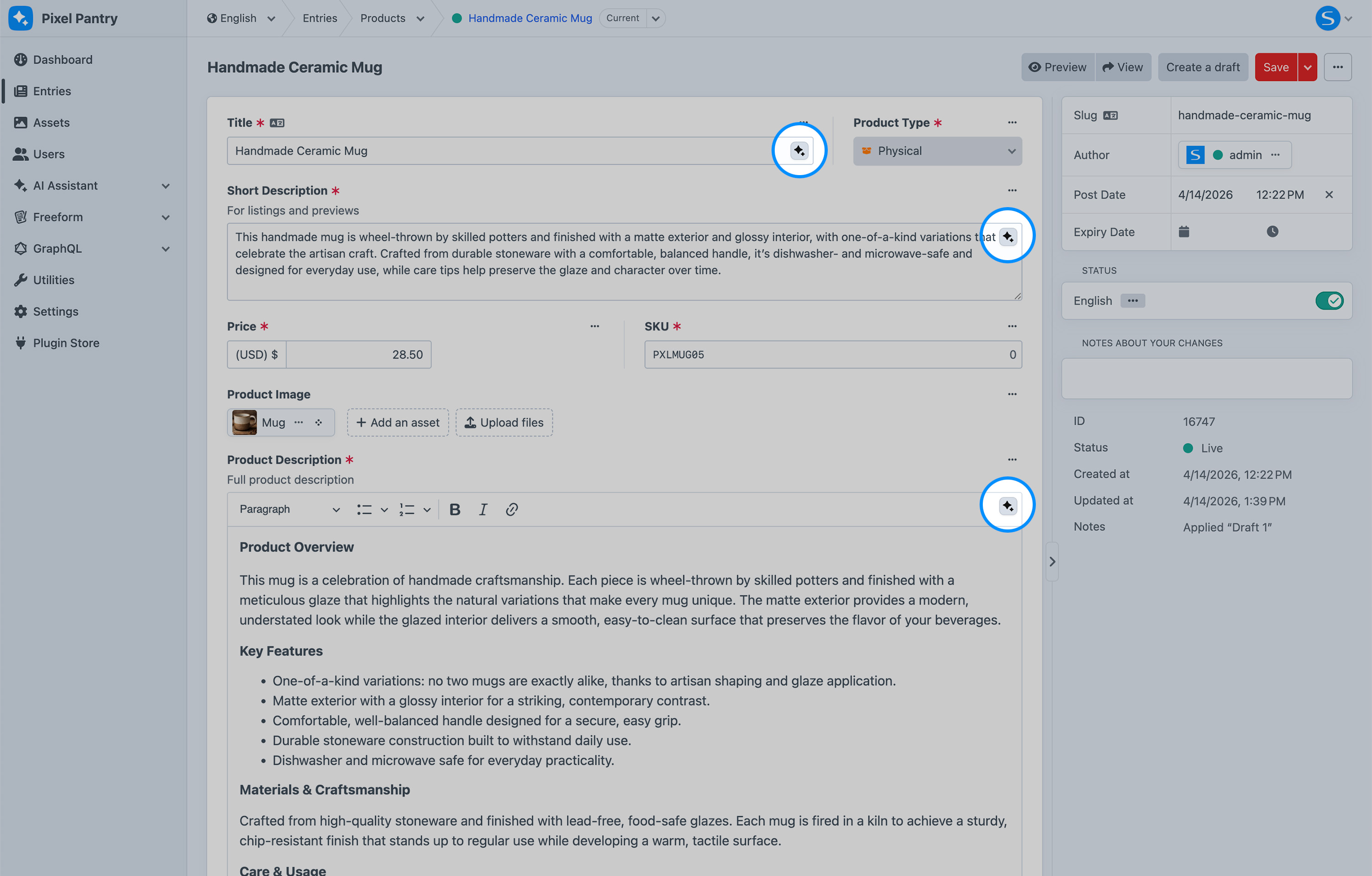
Generate and refine content without leaving your workflow.
The inline AI button appears inside supported fields, giving you instant access to text and image generation as you edit entries and other elements.
- Improve Content and Images
- Generate new content, refine existing text, translate across languages, and even create images — all in one place. Learn more
 Works with Any Craft Element
 - Use AI Assistant across entries, categories, assets, and more, anywhere you work in Craft. Learn more
 Never Leave the Control Panel
 - Work seamlessly inside the Craft control panel with AI tools built directly into your editing experience.
Integrations
Connect to a wide range of AI providers and tailor everything to your needs.
 Multiple AI Providers
 - Choose from a growing list of AI service integrations to fit your workflow. Learn more
 Choose Your AI Models
 - Select the models that best match your performance, cost, and quality needs.
 Set up Multiple integrations
 - Configure multiple providers and models, and choose the best option for each field or use case.
 SolspaceAI
 - Get started in seconds with no setup required. No accounts or credit card needed! Learn more
 1000 Free Credits
 - Every SolspaceAI account includes 1000 free credits to get you started. Learn more
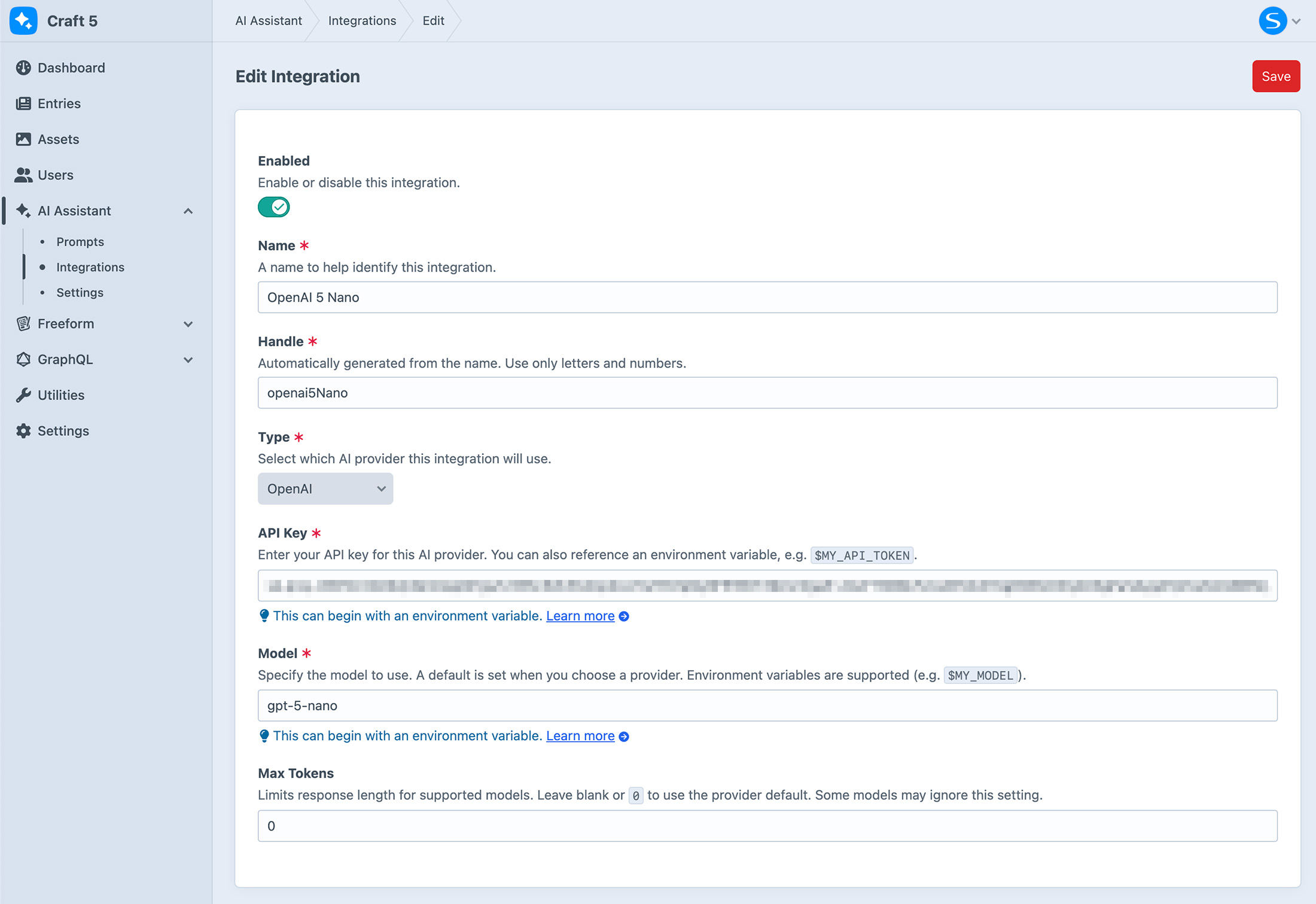
Choose Your Fields
Enable AI Assistant on the fields you want and set a default provider and model for each.
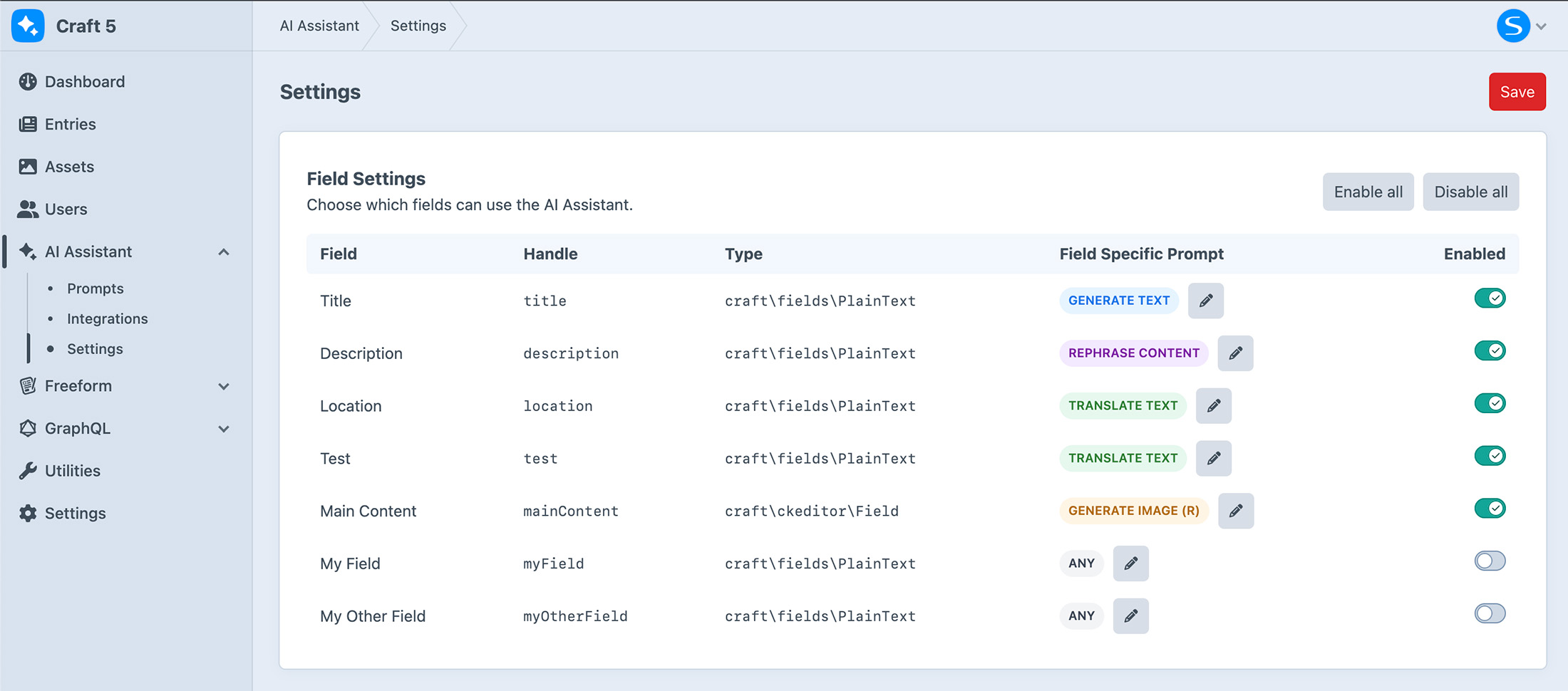
- Field-Specific Prompts
- Create tailored prompts for each field, with automatic preselection in the modal for faster, more consistent content creation. Learn more
 Plain Text
 - Use the inline AI button in the Title and Plain Text fields (single-line and multi-line) for quick, simple content generation. Learn more
 Rich Text
 - Works seamlessly with rich text editors like CKEditor, Redactor, and TinyMCE, giving you AI assistance directly within your content editor. Learn more
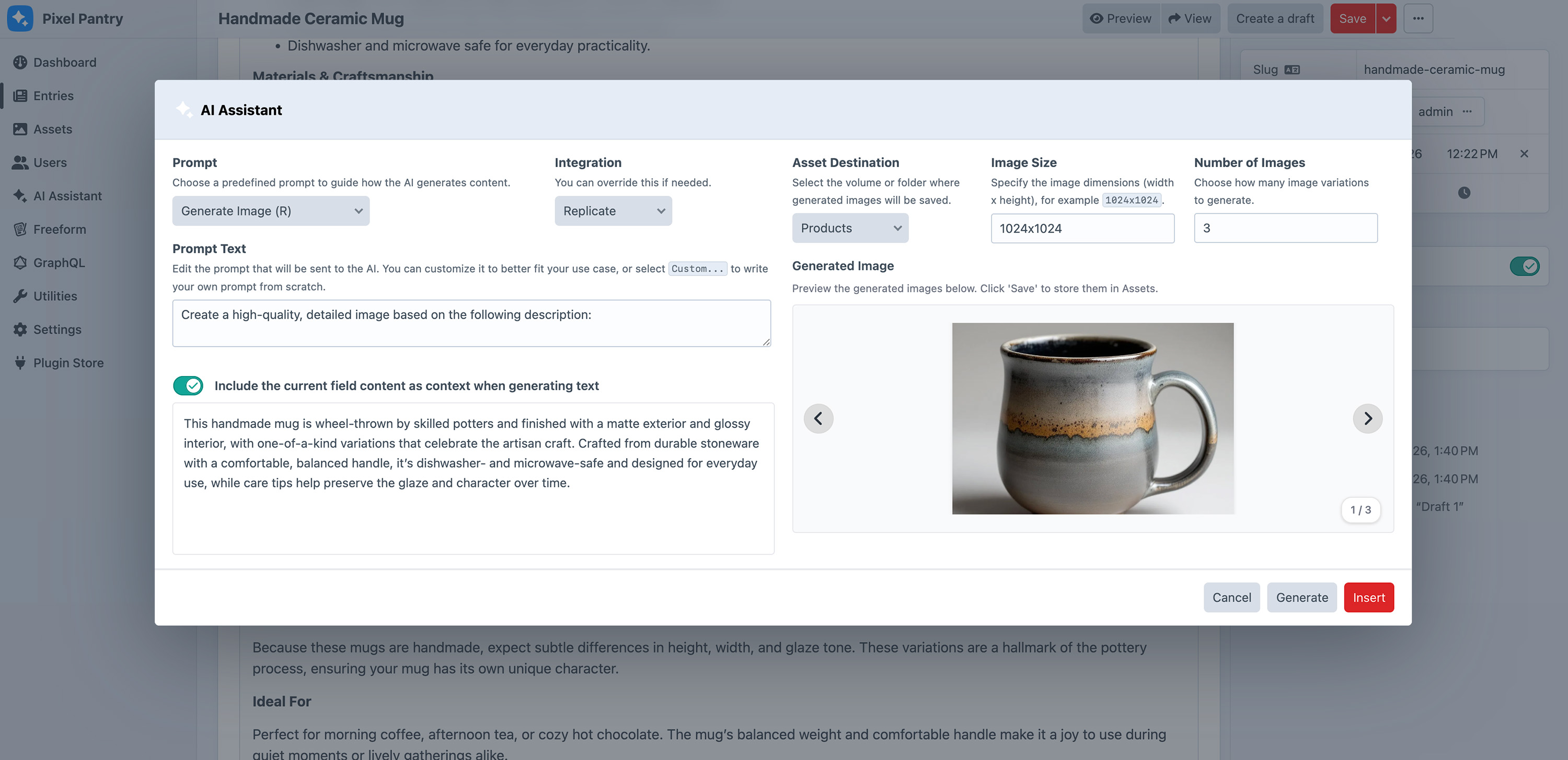
Generate Images
Create high-quality images in seconds, right from the Craft control panel.
- Create Images
- Enter a prompt to generate one or multiple images instantly. Learn more
 Generate Images from Content
 - Use your existing element content as the prompt to quickly generate relevant visuals. Learn more
 Retry As Needed
 - Not quite right? Regenerate images with a single click until you get the result you want.
Why AI Assistant?
Thousands of sites trust Solspace plugins and our team to deliver the quality and support they need.
 Top Notch Support
 - We’re trusted in the Craft CMS community for reliable, high-quality support. Learn more
 25+ Years Experience
 - For more than 25 years, Solspace has been busy creating and supporting software for over tens of thousands of sites. Learn more
 Active Development
 - AI Assistant is continuously updated with new features, improvements, and bug fixes over time. Learn more
Frequently Asked Questions
Frequently asked questions about buying AI Assistant.
- Can I test AI Assistant before I buy?
Yes! You can use AI Assistant on any private domain name for as long as you need, just like with Craft. Whether it's on your local dev server or a staging site, you're good to go. You only have to buy a license when you're ready to launch your site live, just like with Craft.
- How many sites does a license cover?
You only need to buy a AI Assistant license for each Craft license you have. So, if you're running a Craft multi-site on one install, you just need one license. It's just like Craft! There's no need to get separate licenses for other environments of the same site, like development or staging.
- Do you offer discounts to non-profits?
Yes! We offer a discount to non-profits for 20% off the regular price upon proof of non-profit status. Please contact us for more information about this.
- Does the Trial version limit features?
The trial versions of Solspace software are fully functional and not limited in any way. However, if you try to use a trial version on a production site, Craft will display a red banner at the top of your control panel, prompting you to purchase a license.
More information about Craft's license enforcement.- How long does a license last for?
A single license provides one year of updates and support. After this period, you can continue using the plugin but will no longer receive updates or support. To maintain access to updates and support, you will need to renew your license each year at a discounted rate.
- Do I have to renew my license each year?
You can renew your license after the initial one-year support period has ended. Your plugin will continue to work properly in the meantime. If you prefer, you can wait until the following year to renew and receive the latest updates.
However, we don't recommend avoiding updates altogether, as you would miss out on new features and important fixes.- What are renewals and how do they work?
Renewals help you keep your plugin updated and access technical support. However, they are entirely optional.
For example, if you purchase AI Assistant for $19, the renewal price after one year is $9. Your initial purchase of $19 includes support and updates for one year. When it's time to renew, you can extend your updates and support for another year at the renewal price of just $9, rather than paying the full amount of $19 again.- How do I install AI Assistant?
Installing AI Assistant is done just like any other plugin for Craft, similar to how you would install Craft itself. Please refer to the Installation guide in the documentation.
- How do I get support for AI Assistant?
We provide free support for AI Assistant. If you have any questions or encounter issues, you can create an issue on GitHub or send us a private support ticket. We're here to help!