Calendar:Month template tag
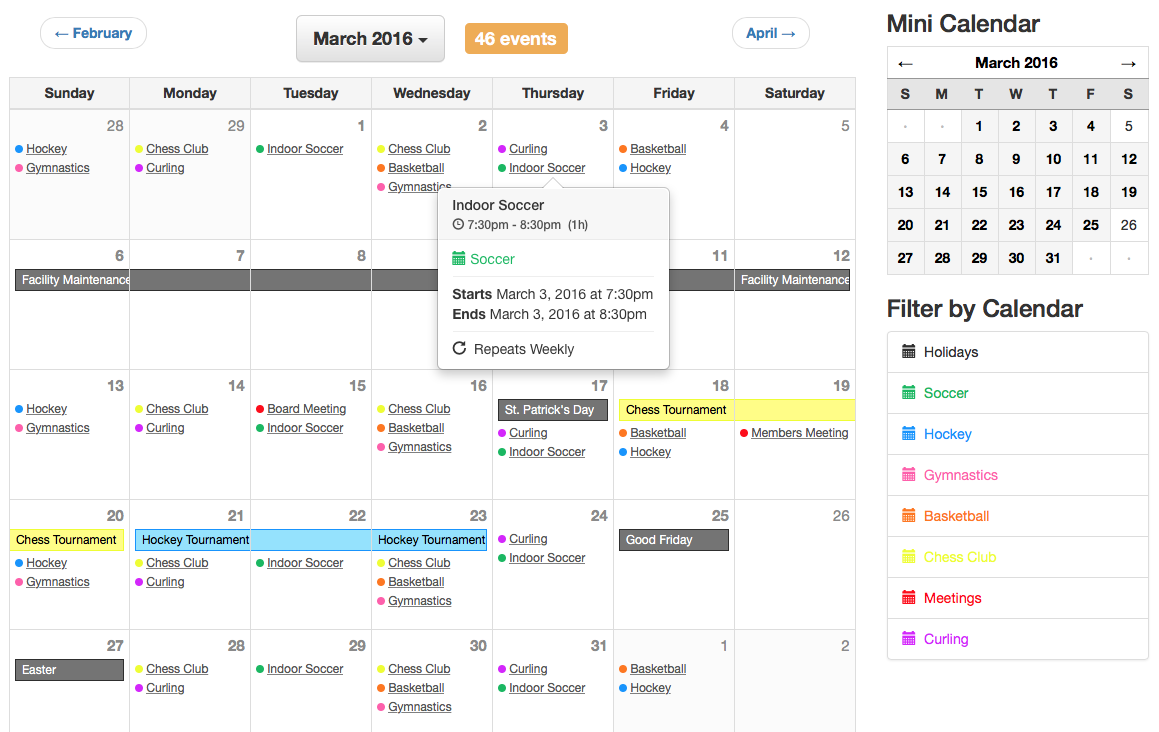
The Calendar:Month tag handles "month-based" formatting and allows you to display a traditional month calendar grid view for a specified month, or the current month.
For performance reasons, please be sure to update any Calendar template tags to use the channel="my_channel|my_other_channel" parameter, similar to how you would do it for {exp:channel:entries}. The demo templates don't include this by default since there's no automated way of knowing which channel(s) you're using.
{exp:calendar:month} content {/exp:calendar:month}
Parameters
author_id
This parameter allows you to filter down the event results by the author of the Calendar event entries. You can hardcode a member ID, pass it through an embed, or grab it from the URI. You can also use CURRENT_USER to display event entries for the currently logged in user. Separate multiples with the pipe character. E.g. author_id="1", author_id="1|5|9" or author_id="CURRENT_USER".
calendar_id
This parameter allows you to display specific calendars by specifying their ID(s). You can hardcode a calendar ID, pass it through an embed, or grab it from the URI. Separate multiples with the pipe character. E.g. calendar_id="3" or calendar_id="1|3".
calendar_short_name
This parameter allows you to display specific calendars by specifying their short names. You can hardcode a short name, pass it through an embed, or grab it from the URI. Separate multiples with the pipe character. E.g. calendar_short_name="dodgeball" or calendar_short_name="soccer|baseball|dodgeball".
category
This parameter allows you to filter down the event results by the category ID assigned to calendar event entries. You can hardcode a category ID, pass it through an embed, or grab it from the URI. Separate multiples with the pipe character. E.g. category="22" or category="22|25|32".
channel
This parameter allows you to filter down the event results by the channel of the calendar event entries. You can hardcode a channel short name, pass it through an embed, or grab it from the URI. Separate multiples with the pipe character. E.g. channel="baseball" or channel="baseball|hockey|chess".
date_range_start
This parameter allows you to specify a particular month to display events for. Regardless of which day of the month you specify, this tag will automatically load the entire month. If this parameter is NOT specified or an incorrect date value is passed to this parameter, the current month will be displayed. Both standard and easy-to-use text date formatting apply to this parameter.
{if segment_3}
  date_range_start="{segment_3}-{segment_4}-01"
{if:else}
  date_range_start="year-month-01"
{/if}
site
If using EE Multiple Site Manager (MSM), you can specify a site short name(s) in this parameter to filter event entries down to that site. E.g. site="siteB" or site="siteA|siteB|siteC".
status
This parameter allows you to filter down the event results by the status of the calendar event entries. You can hardcode a channel short name, pass it through an embed, or grab it from the URI. Separate multiples with the pipe character. E.g. status="open" or status="open|extra".
Variables
Most of the variables listed in Calendar:Events are available for use here (inside of the calendar:events variable pair). Additionally, the following variables are available for use as well:
{calendar:next_month}
This variable displays the month date of the next month. Typically used for linking to next month. E.g. {calendar:next_month format="%F"}.
Available only OUTSIDE of the calendar:events variable pair.
{calendar:previous_month}
This variable displays the month date of the previous month. Typically used for linking to previous month. E.g. {calendar:previous_month format="%F"}.
Available only OUTSIDE of the calendar:events variable pair.
{calendar:month_date}
This variable displays the date of the currently specified month. E.g. {calendar:month_date format="%F %Y"}.
Available only OUTSIDE of the calendar:events variable pair.
{calendar:month_total_events}
This variable displays the total number of events that are happening for a given month.
Available only OUTSIDE of the calendar:events variable pair.
{calendar:week_date}
This variable displays the beginning date of the currently specified week. For example, if you're using Week beginning {calendar:week_date format="%l, %F %j, %Y"}, it will parse as something like Week beginning Sunday, February 14, 2026.
Can be used within the calendar:weeks variable pair and OUTSIDE of the calendar:events variable pair.
{calendar:week_total_events}
This variable displays the total number of events that are happening for a given week.
Can be used within the calendar:weeks variable pair and OUTSIDE of the calendar:events variable pair.
{calendar:day_date}
This variable displays the date of the currently specified day. E.g. {calendar:day_date format="%j"}.
Can be used within the calendar:days variable pair and OUTSIDE of the calendar:events variable pair.
{calendar:day_total_events}
This variable displays the total number of events that are happening for a given day.
Can be used within the calendar:days variable pair and OUTSIDE of the calendar:events variable pair.
Variable Pairs
{calendar:weeks}
This variable pair handles the formatting for each weeks. It is primarily used to handle the output of week rows in a full month calendar.
{calendar:days_of_week}
This variable pair handles the formatting for each day of the week. It is primarily used for displaying the weekday headings for the month calendar (ex: Monday, Tuesday, Wednesday, etc).
Inside of this variable pair, the following formatted date variables are available for use:
{calendar:day_of_week_full}- parses as Sunday, Monday, Tuesday, Wednesday, Thursday, Friday, Saturday{calendar:day_of_week_1_letter}- parses as S, M, T, W, T, F, S{calendar:day_of_week_2_letter}- parses as Su, Mo, Tu, We, Th, Fr, Sa{calendar:day_of_week_3_letter}- parses as Sun, Mon, Tue, Wed, Thu, Fri, Sat{calendar:day_of_week format="%F %j"}- formatted to your choice using EE date formatting
{calendar:days_of_week}
  {calendar:day_of_week_full}
{/calendar:days_of_week}
{calendar:days}
This variable pair handles the formatting for each day. It is primarily used to handle the output of each day cell in a full month calendar.
{calendar:events}
This variable pair handles the formatting of each event result. Most of the variables listed in Calendar:Events are available for use here, prefixed with calendar:.
To help your multi-day events have a better chance at displaying nicely across multiple days, the follow sort order override happens for Calendar:Months tag:
- Multi-day events, sorted by end date in descending order, meaning that the longer the multi-day event, the higher priority it gets.
- All day events
- Regular events (non all day, non multi-day), sorted by their start date in ascending order.
This means that a multi-day event that starts at 10am on its first day will show up before a regular event that starts at 8am, to increase the odds of the multi-day event spanning all of its days in an unbroken horizontal line.
Conditionals
{calendar:no_results}
This conditional displays its contents when there is no event results for the given parameters.
Available only within the calendar:events variable pair.
{if calendar:no_results}
  Sorry, no events exist for the specified parameters.
{/if}
{calendar:event_all_day}
This conditional will displays its contents if the event is an all day event. E.g. {if calendar:event_all_day}{/if}.
Available only within the calendar:events variable pair.
{calendar:event_multi_day}
This conditional will displays its contents the event occurs on multiple days. E.g. {if calendar:event_multi_day}{/if}.
Available only within the calendar:events variable pair.
{calendar:event_recurs}
This conditional will displays its contents if the event has recurrence rules. E.g. {if calendar:event_recurs}{/if}.
Available only within the calendar:events variable pair.
{calendar:event_is_past}
This conditional will displays its contents if the event is finished / has past. While this will work correctly with recurrences in Calendar:Events tag, one caveat is that this will not work correctly if attempting to use with recurring events in the Calendar fieldtype in Channel:Entries tag, as it will only be able to check against the first/main event. E.g. {if calendar:event_is_past}{/if}
{calendar:event_is_current}
This conditional will displays its contents if the event is currently happening. While this will work correctly with recurrences in Calendar:Events tag, one caveat is that this will not work correctly if attempting to use with recurring events in the Calendar fieldtype in Channel:Entries tag, as it will only be able to check against the first/main event. E.g. {if calendar:event_is_current}{/if}.
{calendar:event_is_future}
This conditional will displays its contents if the event is in the future / has not yet started. While this will work correctly with recurrences in Calendar:Events tag, one caveat is that this will not work correctly if attempting to use with recurring events in the Calendar fieldtype in Channel:Entries tag, as it will only be able to check against the first/main event. E.g. {if calendar:event_is_future}{/if}.
{calendar:event_ampm_match}
This conditional will display its contents if the start date and end date's am/pm values match. A common reason you might use this would be if you wanted to display event dates/times like 4:00 - 6:30pm rather than 4:00pm - 6:30pm. More practical code might look like:
{calendar:event_start_date format="%l, %F %j, %Y"} at
{calendar:event_start_date format="%g:%i"}
{if calendar:event_ampm_match}
{if:else}
  {calendar:event_start_date format="%a"}
{/if}
- {calendar:event_end_date format="%g:%i%a"}
{calendar:event_first_day}
This conditional will displays its contents if the event spans more than 1 day, and the current day is when the event starts. E.g. {if calendar:event_first_day}{/if}.
Available only within the calendar:events variable pair.
{calendar:event_last_day}
This conditional will displays its contents if the event spans more than 1 day, and the current day is when the event ends. E.g. {if calendar:event_last_day}{/if}.
Available only within the calendar:events variable pair.
{calendar:day_in_current_month}
This conditional is typically used for formatting the month grid and will display its contents if the day is within the current month. E.g. {if calendar:day_in_current_month}{/if}.
Available only within the calendar:days variable pair.
{calendar:day_is_weekend}
This conditional is typically used for formatting the month grid and will display its contents if the day occurs on the weekend (Saturday or Sunday). E.g. {if calendar:day_is_weekend}{/if}.
Available only within the calendar:days variable pair.
{calendar:day_is_weekday}
This conditional is typically used for formatting the month grid and will display its contents if the day occurs on a weekday (Monday to Friday). E.g. {if calendar:day_is_weekday}{/if}.
Available only within the calendar:days variable pair.
{calendar:current_day}
This conditional will displays its contents if the day is in the current day / today. E.g. {if calendar:current_day}{/if}.
Available only OUTSIDE of the calendar:events variable pair.
{calendar:current_week}
This conditional will displays its contents if the day is in the current week. E.g. {if calendar:current_week}{/if}.
Available only OUTSIDE of the calendar:events variable pair.
{calendar:current_month}
This conditional will displays its contents if the day is in the current month. E.g. {if calendar:current_month}{/if}.
Available only OUTSIDE of the calendar:events variable pair.
{calendar:current_year}
This conditional will displays its contents if the day is in the current year. E.g. {if calendar:current_year}{/if}.
Available only OUTSIDE of the calendar:events variable pair.
Examples
We strongly recommend you install the Demo Templates included with Calendar to see a more real-world, ready-to-go example that should work instantly with your site event data.
The below example shows you what the code might look like for creating a full calendar:
{exp:calendar:month
{if segment_3} {!-- Are we looking at a month other than today? --}
date_range_start="{segment_3}-{segment_4}-01"
{if:else} {!-- Or are we looking at current month? --}
date_range_start="today"
{/if}
}
<table id="calendar">
<thead>
<tr>
<th colspan="2">
<a href="{path='calendar/month'}/{calendar:previous_month format='%Y/%m'}/">
« {calendar:previous_month format="%F"}
</a>
</th>
<th colspan="3">{calendar:month_date format="%F %Y"}</th>
<th colspan="2">
<a href="{path='calendar/month'}/{calendar:next_month format='%Y/%m'}/">
{calendar:next_month format="%F"} »
</a>
</th>
</tr>
<tr>
{calendar:days_of_week}
<th class="day_of_week">{calendar:day_of_week_full}</th>
{/calendar:days_of_week}
</tr>
</thead>
<tbody>
{calendar:weeks}
<tr>
{calendar:days}
{if calendar:day_in_current_month}
<td class="day_cell">
<div class="date">
<a href="{path='calendar/day'}/{calendar:day_date format='%Y/%m/%d'}/">
{calendar:day_date format="%j"}
</a>
</div>
{if:else}
<td class="day_cell out_of_range">
<div class="date">{calendar:day_date format="%j"}</div>
{/if}
{calendar:events}
<div class="
event
{if calendar:event_all_day}all_day{/if}
{if calendar:event_multi_day}multi_day{/if}
">
<a href="{path='calendar/events'}/{calendar:url_title}/">{calendar:title}</a>
{if calendar:event_multi_day != "" OR calendar:event_all_day != ""}
{calendar:event_start_date format="%g:%i%a"}
{/if}
</div>
{/calendar:events}
</td>
{/calendar:days}
</tr>
{/calendar:weeks}
</tbody>
</table>
{/exp:calendar:month}
The below example shows you what the code might look like for creating a clickable mini calendar:
{exp:calendar:month
{if segment_3} {!-- Are we looking at a month other than today? --}
date_range_start="{segment_3}-{segment_4}-01"
{if:else} {!-- Or are we looking at current month? --}
date_range_start="today"
{/if}
}
<table>
<thead>
<tr>
<th colspan="1">
<a href="{path='calendar/month'}/{calendar:previous_month format='%Y/%m'}/">←</a>
</th>
<th colspan="5">
<a href="{path='calendar/month'}/{calendar:month_date format='%Y/%m'}/">{calendar:month_date format="%F %Y"}</a>
</th>
<th colspan="1">
<a href="{path='calendar/month'}/{calendar:next_month format='%Y/%m'}/">→</a>
</th>
</tr>
<tr>
{calendar:days_of_week}
<th>{calendar:day_of_week_1_letter}</th>
{/calendar:days_of_week}
</tr>
</thead>
<tbody>
{calendar:weeks}
<tr>
{calendar:days}
<td>
<div>
{if calendar:day_in_current_month} {!-- Only show day number for current month --}
{if calendar:day_total_events} {!-- Link to the day if there's events for it --}
<a href="{path='calendar/day'}/{calendar:day_date format='%Y/%m/%d'}/">
{/if}
{calendar:day_date format="%j"}
{if calendar:day_total_events} {!-- Link to the day if there's events for it --}
</a>
{/if}
{if:else} {!-- Don't show day number if day is not in current month --}
<strong>·</strong>
{/if}
</div>
</td>
{/calendar:days}
</tr>
{/calendar:weeks}
</tbody>
</table>
{/exp:calendar:month}