Form SchedulingLiteProNew in 5.17+
Set an opening date, an expiry date, or both. Freeform shows your chosen message outside that period and rejects submissions before the start or after the end. Scheduling is available in Lite and Pro.
Setup
Open your form in the form builder and go to Settings → Limits.
Enable Schedule Form.
Set Schedule Start Date, Schedule End Date, or both, including the time.
Customize Pending Message and Expired Message, then save the form.
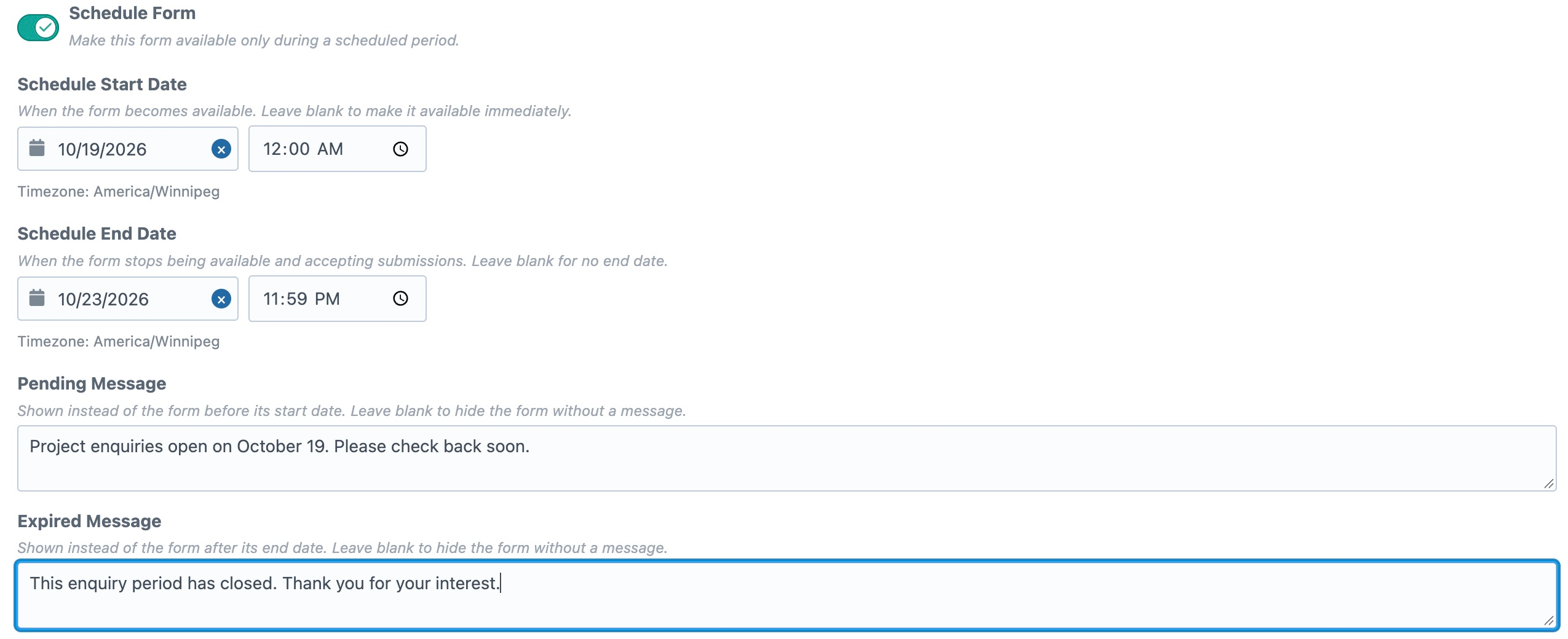
| Setting | Behavior |
|---|---|
| Schedule Form | Enables the schedule. Turn it off to ignore the saved dates without clearing them. |
| Schedule Start Date | The form becomes available at this date and time. Leave blank to make it available immediately. The first date selection defaults to 00:00. |
| Schedule End Date | The final date and time at which the form is available. Leave blank for no expiry. The first date selection defaults to 23:59; adjust it as needed. |
| Pending Message | Shown before the start. Defaults to “This form is not available yet.” Leave blank to hide the form without a message. |
| Expired Message | Shown after the end. Defaults to “This form is no longer available.” Leave blank to hide the form without a message. |
When both dates are set, the end must be later than the start. Both boundaries are inclusive: a form scheduled from 9:00am to 5:00pm is available at those exact instants, and expires after 5:00pm.
The controls display the browser's timezone beneath the date and time fields. Use that timezone when setting the schedule. Freeform stores the timezone offset and checks the actual instant, so visitors in different timezones share the same opening and closing times.
Rendering in Twig
- Automatic Rendering
- Custom Layout
The standard form.render() method handles the schedule automatically:
{% set form = freeform.form('contact') %}
{% if form %}
    {{ form.render() }}
{% endif %}
Before the start or after the end, Freeform renders the appropriate message instead of loading the formatting template. Messages are plain text, escaped for HTML, with line breaks preserved. The wrapper is a <div class="freeform-schedule-message" role="status">, which you can style in your site's CSS.
If the message is blank, form.render() outputs nothing while the form is unavailable. Messages can be translated per site through Freeform's form translations.
When calling form.renderTag() and field helpers directly in a page template, check form.isAvailable() before rendering any form markup:
{% set form = freeform.form('contact') %}
{% if form %}
    {% if form.isAvailable() %}
        {{ form.renderTag() }}
        {% for row in form %}
            <div class="form-row">
                {% for field in row %}
                    {{ field.render() }}
                {% endfor %}
            </div>
        {% endfor %}
        {{ form.renderClosingTag() }}
    {% else %}
        {# Let Freeform choose the schedule or submission-limit message. #}
        {{ form.render() }}
    {% endif %}
{% endif %}
The unavailable branch uses form.render() to preserve message priority and blank-message behavior, including when Limit Submissions is also enabled. The form query still returns the form outside its schedule. Opening and closing tag helpers do not hide it automatically. A custom formatting template called through form.render() already benefits from the automatic schedule check.
Template Reference
| Twig expression | Returns |
|---|---|
form.isAvailable() | Whether the schedule and enabled builder submission limit permit the form to be displayed. Also accessible as form.available. |
form.scheduleMessage | The translated pending or expired message, or an empty string while available. |
form.settings.scheduleEnabled | Whether scheduling is enabled. |
form.settings.startSubmissionsAt | The start date and time, or null. |
form.stopSubmissionsAfter | The end date and time, or null. Also available as form.settings.stopSubmissionsAfter. |
form.isAvailable() also accounts for an enabled builder submission cap. Visitor duplicate checks remain separate.
Submission Validation and Headless Forms
Freeform checks the schedule on the server during validation, including AJAX, REST, GraphQL, and submission editing. A form loaded before its expiry can still be rejected if it is submitted after the end time. Leaving a display message blank does not disable validation.
Headless manifest requests still return the form configuration outside the scheduled period. The API does not run Twig's automatic rendering behavior or hide your frontend's form. Handle the availability display in your custom frontend; scheduled submission validation still applies. See the REST API and GraphQL references.
Updating Existing Forms
The former Stop Submissions After Date setting is now Schedule End Date. Existing cutoffs automatically enable the schedule and retain the entire final day, through 23:59:59. Existing forms without a cutoff remain unscheduled.
The stored property name remains stopSubmissionsAfter, so existing references to the end date continue to work. For availability checks, use form.isAvailable() to account for the toggle, opening time, and closing time together.
Caching
Cached HTML can retain a pending message after the opening time or display a form after it expires. Render the scheduled form dynamically, or arrange for your page cache to refresh at the schedule boundaries. Refreshing CSRF tokens alone does not refresh the form's display. Server-side schedule validation still applies to submissions from cached pages.
See Caching Forms for dynamic rendering options.