PDF Template ExamplesPro
PDF templates are managed in the control panel. Create a template in Freeform → Settings → PDF Templates, set its file name and HTML body, then assign it to an email notification. See PDF Templates for the template fields and attachment settings.
Loading Images
When using images in your PDF template, it's important to use dataUrl(asset) to create an inline Base64 image to avoid PDF image loading issues.
<div class="ticket-image">
  {% set image = craft.assets.id(123).one() %}
  {% if image %}
    <img src="{{ dataUrl(image) }}" alt="{{ image.alt ?? image.title }}" />
  {% endif %}
</div>
Event Ticket
The example below will generate an event ticket for the form submitter:
<!DOCTYPE html>
<html lang="en">
<head>
  <meta charset="UTF-8">
  <title>Event Ticket</title>
  <style>
    body { font-family: Helvetica, Arial, sans-serif; font-size: 12px; color: #222; margin: 0; padding: 20px; }
    .ticket { border: 2px dashed #444; padding: 20px; width: 100%; }
    .ticket-header { text-align: center; border-bottom: 1px solid #ccc; padding-bottom: 10px; margin-bottom: 15px; }
    .ticket-header h1 { font-size: 20px; margin: 0; letter-spacing: 1px; }
    .ticket-header h3 { font-size: 14px; margin: 5px 0 0; font-weight: normal; }
    .event-details { text-align: center; margin-bottom: 15px; }
    .event-details p { margin: 3px 0; }
    .ticket-image { text-align: center; margin: 15px 0; }
    .ticket-image img { max-width: 100%; height: auto; border: 1px solid #ccc; }
    .ticket-holder { border-top: 1px solid #ccc; padding-top: 10px; margin-top: 15px; }
    .ticket-holder h4 { font-size: 13px; margin: 0 0 5px; text-transform: uppercase; }
    .ticket-holder ul { list-style: none; padding: 0; margin: 0; }
    .ticket-holder li { margin-bottom: 3px; }
    .ticket-footer { margin-top: 15px; text-align: center; font-size: 10px; color: #666; }
  </style>
</head>
<body>
  <div class="ticket">
    <div class="ticket-header">
      <h1>TICKET #{{ submission.id }}</h1>
      <h3>Competitive Duck Watching Championship</h3>
    </div>
    <div class="event-details">
      <p>Saturday, April 12, 2025 · 10:00 AM – 2:00 PM</p>
      <p>Riverside Community Park</p>
      <p>214 Waddle Way, Mapleton, BC</p>
    </div>
    <div class="ticket-image">
      {% set image = craft.assets.id(123).one() %}
      {% if image %}
        <img src="{{ dataUrl(image) }}" alt="{{ image.alt ?? image.title }}" />
      {% endif %}
    </div>
    <div class="ticket-holder">
      <h4>Ticketholder</h4>
      <ul>
        <li>{{ firstName }} {{ lastName }}</li>
        {% if companyName|length %}
          <li>{{ companyName }}</li>
        {% endif %}
        <li>Purchased: {{ dateCreated|date('Y-m-d H:i') }}</li>
      </ul>
    </div>
    <div class="ticket-footer">
      Please bring this ticket (printed or digital) to the event.
    </div>
  </div>
</body>
</html>
Which will generate a PDF that looks something like this:
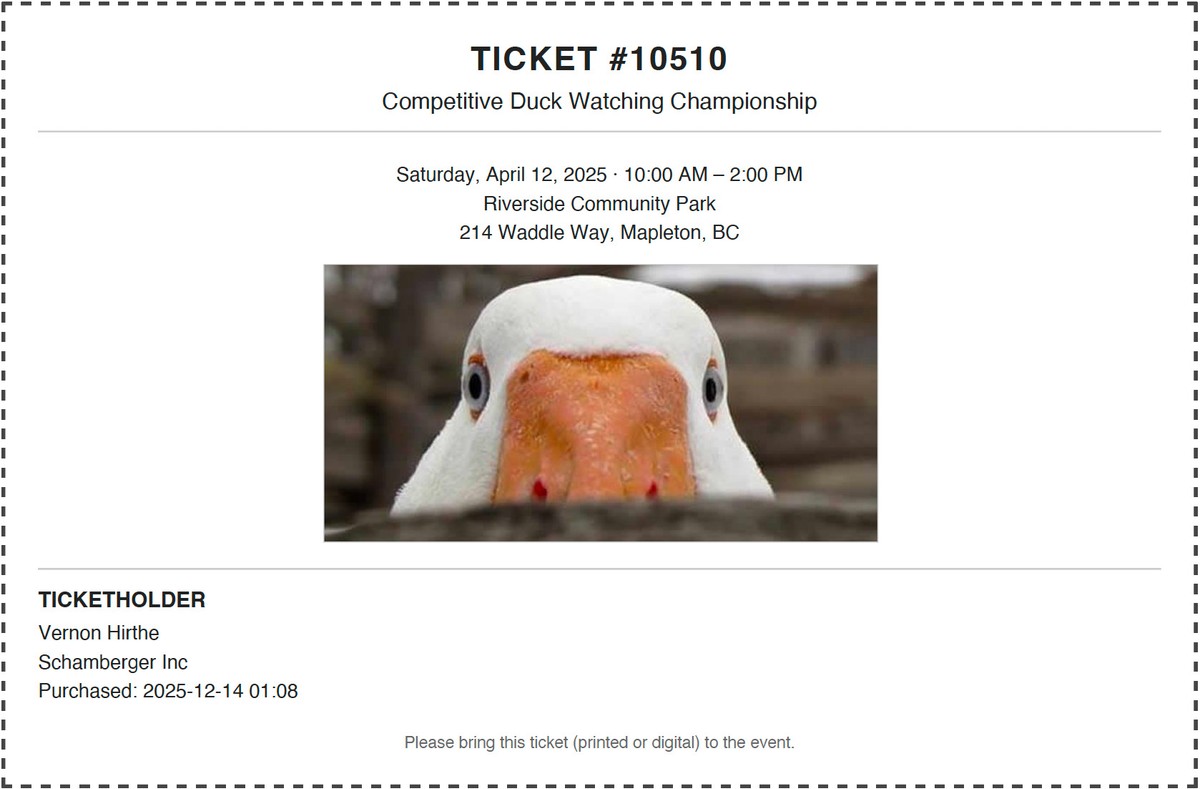
The example uses firstName, lastName, and companyName; adjust these variables to match your form's field handles. Replace the example asset ID with an image from your own site.