Date & TimePro
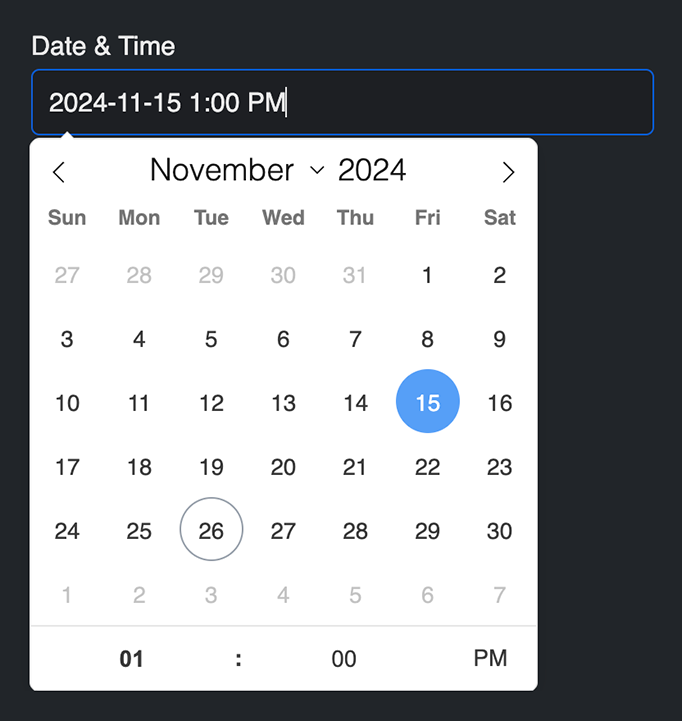
A complex date and/or time field. Can be used as Date only, Time only, or both. Many configuration and validation options available as well. The field.type property value is datetime (for conditionals).
Settings
- May contain a default date value.
- Use an English date expression such as
now,today,5 days ago, or2025-01-01 20:00:00. Freeform formats the result using the configured display format and locale.
- Use an English date expression such as
- The default Freeform datepicker can be disabled and you can load your own manually in the template if you wish.
- Freeform will automatically insert javascript in the footer/inside form (depending on settings) of the page for this fieldtype.
- Choose to have your own placeholder or have Freeform generate a placeholder based on the settings below.
- Set the date order formatting you'd like:
year month day,month day year,day month year
- Select if the year should be displayed/validated as 4 digits.
- Select if the day and month numbers should have a leading
0for single digit values (e.g. August will display as08instead of8). - Choose the date separator character used between each year, month, day value:
- None, Space (
/,-,.
- None, Space (
- Select if time and datepicker should use 24 hour clock.
- Choose the clock separator character used to separate hours and minutes:
- None, Space (
:,-,.
- None, Space (
- Choose if placeholder should separate AM/PM with a space (for 12hr clock).
- Select the Min and Max dates for the date picker and validation (optional). Use static dates (e.g.
2018-11-01,2018-11-30) or relative date strings (e.g.-10 days,+3 months).
Date Expressions and Native InputsImproved in 5.17.3+
Keep Initial value, Minimum date, and Maximum date expressions in English, regardless of the control panel language. For example, enter today or +3 months even in a French or German control panel. In 5.17.3+, the builder's examples remain in English to avoid suggesting translated expressions that cannot be parsed. The displayed date and picker interface can still be localized.
When Use native input types is enabled, date fields render as date, time fields as time, and combined fields as datetime-local. Native date and combined inputs receive configured minimum and maximum date constraints in the browser's required format. Native time-only inputs omit those date constraints, so dates left over from a field's previous mode cannot block time entry.
Behavior & Limitations
For localization reference:
- The Flatpickr date picker will automatically localize according to the locale set for your site. Locales available are only 2-letter codes like
fr,de, etc. In the event you're using a locale likefr-CAores-US, etc, Freeform will just look at the first 2 letters and use that as the locale. - To translate the formatting syntax error message, be sure to translate the following strings:
"{value}" does not conform to "{format}" format.- To translate the
{format}rendered value to match the current locale, be sure to also translate whatever the rendered string is in the error message. For example, if you're usingfrlocale, and wish to have the default EnglishDD/MM/YYYYshow up asJJ/MM/AAAA, create a static translation for this manually.
Dark picker themeNew in 5.17.3+ - bundled dark formatting templates automatically use a matching dark date and time picker. For custom templates, add data-freeform-theme="dark" to the form or a surrounding element. See Date Picker Events for manual dark/light overrides, CSS color customization, and JavaScript examples.
Templating
| Property | Description |
|---|---|
field.initialValue | The initial date or time expression for the current language. Date expressions must remain in English. |
field.dateTimeType | The configured mode: date, time, or both. |
field.generatePlaceholder | Whether the placeholder is generated from the configured format. |
field.dateOrder | The date component order, such as ymd. |
field.date4DigitYear | Whether the year uses four digits. |
field.dateLeadingZero | Whether date components use leading zeroes. |
field.dateSeparator | The separator between date components. |
field.clock24h | Whether times use a 24-hour clock. |
field.clockSeparator | The separator between hours and minutes. |
field.clockAMPMSeparate | Whether a space separates the time from AM or PM. |
field.useDatepicker | Whether Freeform uses its JavaScript date picker. Returns false when native input types are enabled. |
field.minDate | The minimum date expression for the current language, or null when unset. Date expressions must remain in English. |
field.maxDate | The maximum date expression for the current language, or null when unset. Date expressions must remain in English. |