CalculationProNew in 5.1+
The Calculation field type lets you perform dynamic calculations based on user-input values in your forms. It also supports a wide variety of operators.
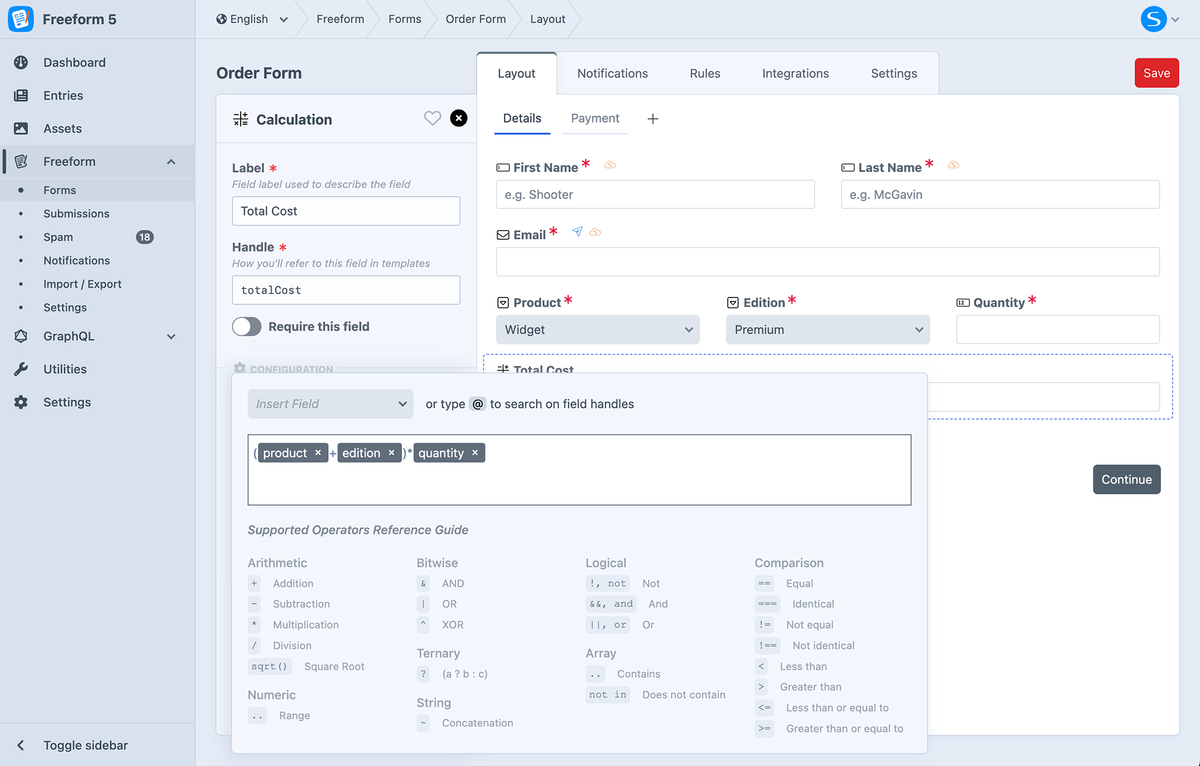
For the Calculation field to work as a dynamic amount with the Stripe Payments integration, the Input Type setting should be set to Regular Text Input or Plain Text. If set to Hidden, the Calculation field should be within a multipage setup where it is on a page before the page with the Stripe Payment Element field.
Settings
The following additional settings are available to this field type:
Decimal CountNew in 5.6+
The Decimal Count setting allows you to set the maximum number of decimal places the calculated result should have. Leave blank if you don't want to limit the decimal places. If you'd like to have no decimals (whole numbers only), enter a value of 0.
Behavior & Limitations
Supported Field Types
The following fields can be accessed within field calculation formulas:
Supported Operators
Utilizing Symfony Expression Syntax, the Calculation field type empowers users to create sophisticated calculations effortlessly. From fundamental arithmetic to complex logical operations, users can employ an array of operators and functions to achieve desired outcomes.
Click on the tabs below to learn more about each operator:
- Arithmetic
- Comparison
- Logical
- String
- Array
- Numeric
- Ternary
| Operator | Description |
|---|---|
+ | Addition |
- | Subtraction |
* | Multiplication |
/ | Division |
sqrt() | Square RootNew in 5.9.3+ |
Example
- Formula
- Values
- Output
(field1 - field2) + field3
(12 - 3) + 45
54
| Operator | Description |
|---|---|
== | Equal |
=== | Identical |
!= | Not equal |
!== | Not identical |
< | Less than |
> | Greater than |
<= | Less than or equal to |
>= | Greater than or equal to |
matches | Regex match |
Example
- Formula
- Values
- Output
field1 >= field2
40 >= 50
false
| Operator | Description |
|---|---|
! or not | Not |
&& or and | And |
|| or or | Or |
Example
- Formula
- Values
- Output
field1 > field2 || field1 < field3
10 > 10 || 10 < 20
true
| Operator | Description |
|---|---|
~ | Concatenation |
Example 1
- Formula
- Values
- Output
'Hello ' ~ firstName ~ ', ' ~ 'Welcome!'
'Hello ' ~ 'Bob' ~ ', ' ~ 'Welcome!'
Hello Bob, Welcome!
Example 2
- Formula
- Values
- Output
nameTitle ~ ' ' ~ firstName ~ ' ' ~ lastName
'Dr.' ~ ' ' ~ 'Sarah' ~ ' ' ~ 'Connor'
Dr. Sarah Connor
| Operator | Description |
|---|---|
in | Contains |
not in | Does not contain |
Example
- Formula
- Values
- Output
field1 in ['apple', 'orange', 'banana']
'banana' in ['apple', 'orange', 'banana']
true
| Operator | Description |
|---|---|
? | Operator that takes three operands |
Example
- Formula
- Values
- Output
field1 == 5 ? 'yes' : 'no'
5 == 5 ? 'yes' : 'no'
yes