PDF TemplatesProNew in 5.7+
Create custom PDFs from HTML and Twig, then attach them to email notifications. Open Freeform → Settings → PDF Templates to manage them.
PDF templates remain editable when Craft's allowAdminChanges setting is false.
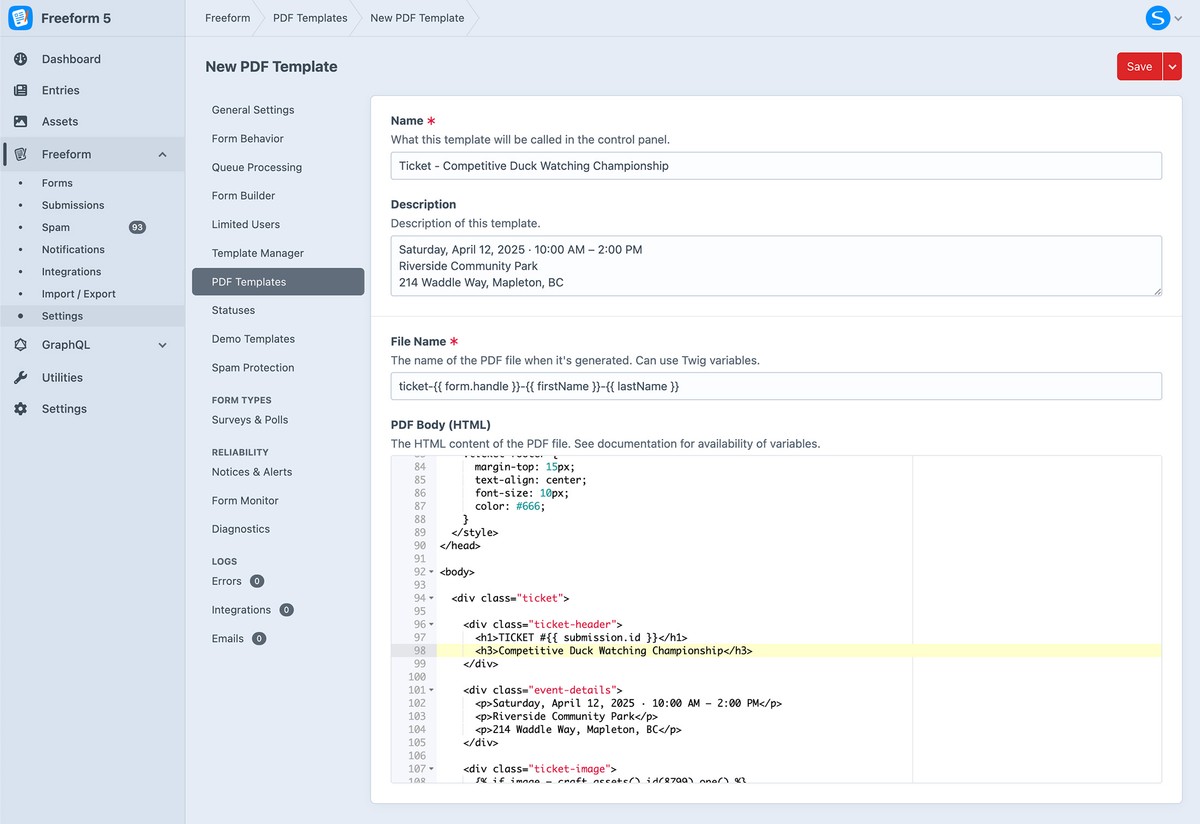
Template Fields
- Name — identify the template in the control panel.
- Description — explain what the template generates.
- File Name — the name of the generated PDF; Twig variables are supported.
- PDF Body — the HTML and Twig used to generate the document.
Both the file name and body can use the email notification template variables.
Attach a PDF to a Notification
Edit an Email Notification template and select the PDF templates to attach. You can attach more than one template to a notification.
Loading Images
When using images in your PDF template, it's important to use dataUrl(asset) to create an inline Base64 image to avoid PDF image loading issues.
<div class="ticket-image">
  {% set image = craft.assets.id(123).one() %}
  {% if image %}
    <img src="{{ dataUrl(image) }}" alt="{{ image.alt ?? image.title }}" />
  {% endif %}
</div>
Examples
See PDF Template Examples for a complete event-ticket template and its output.
See Settings for other configuration areas.