General Settings
Plugin naming, sites, exports, submission data, and automatic cleanup. Open Freeform → Settings → General Settings to configure these options.
This settings page is read-only when Craft's allowAdminChanges setting is false.
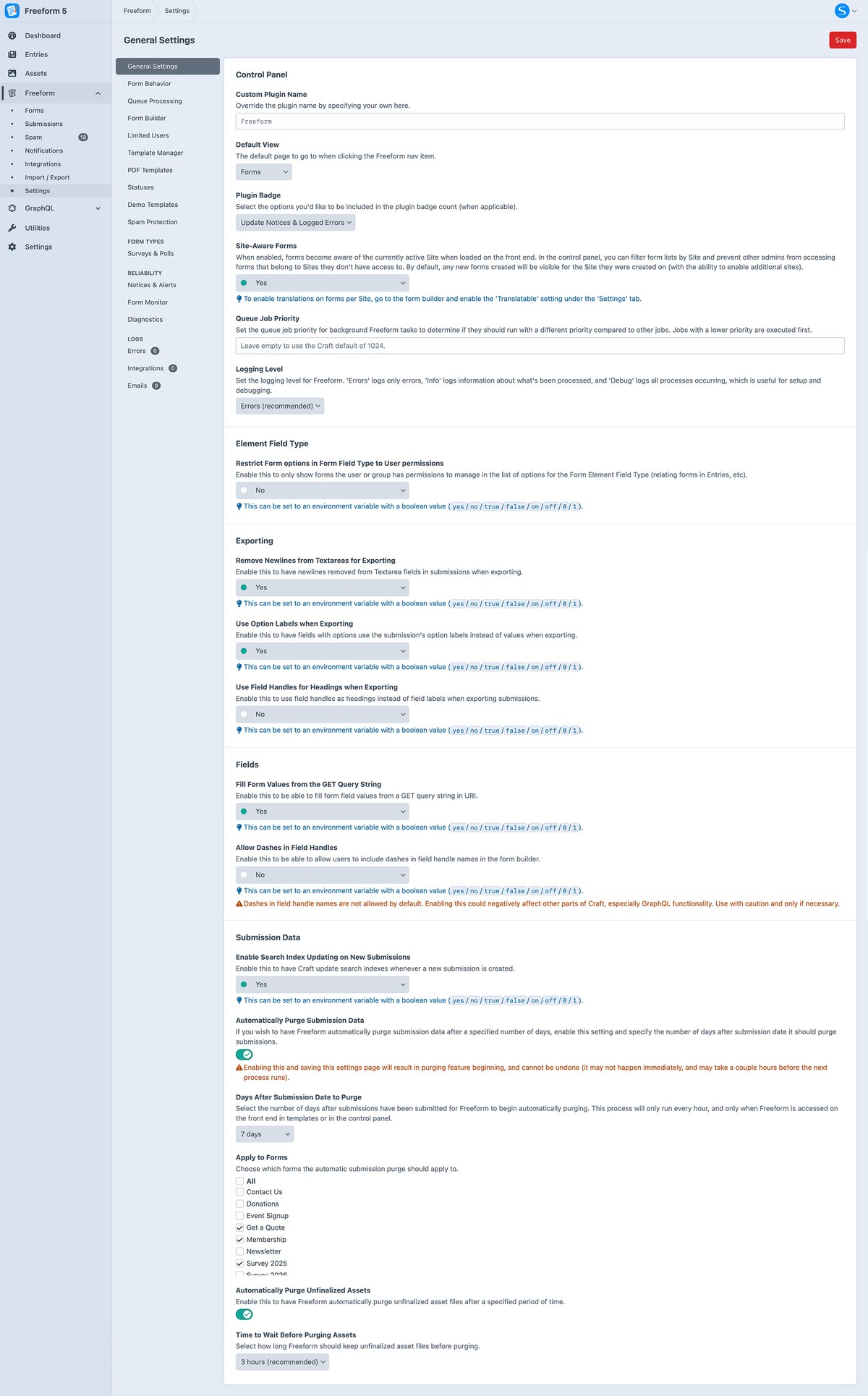
Plugin Interface
Custom Plugin NamePro
Replace the Freeform name shown in the control panel. Leave this empty to use the standard plugin name.
Default view
Choose whether clicking Freeform in the control panel navigation opens Forms (forms) or Submissions (submissions).
Form Creation OptionsNew in 5.17.2+
Choose which methods appear under Add new form: Guided setup, Create with AI (Pro only), and Quick setup. Select at least one. If only one method is selected, it opens directly without the chooser. AI still requires a suitable edition, user permissions, and integration setup.
Default AI Integration for Form CreationProNew in 5.17.2+
Preselect an enabled AI integration when creating forms with Create with AI. Users can choose another integration in the dialog. With No default — choose when creating a form, or if the configured integration becomes unavailable, users must select an integration themselves.
This setting applies to form generation. Spam protection and other AI features retain their own integration settings.
Plugin Badge
Choose what contributes to Freeform's navigation badge: updates and logged errors, updates only, errors only, submissions, or spam submissions. You can also hide the badge.
Sites & Access
Site-Aware FormsProNew in 5.2+, Improved in 5.7+
Make forms site-aware so they can be assigned to Craft sites and have translated labels and messages. See Site-Aware Forms.
Restrict Form options in Form Field Type to User permissions
Limit the forms offered by the Form Element field type to those the user has permission to manage.
Processing & Logging
Queue Job PriorityNew in 5.5.6+
Set the priority of Freeform background jobs. Lower numbers run first. Leave this empty to use Craft's normal queue priority.
Logging LevelNew in 5.9+
Choose Errors (error), Info (info), or Debug (debug). Errors records failures; Info adds processing information; Debug includes more detailed activity. See Logs.
Exporting
Remove Newlines from Textareas for Exporting
Remove line breaks from textarea values when exporting submissions.
Use Option Labels when Exporting
Export the labels selected in option fields instead of their stored values.
Use Field Handles for Headings when Exporting
Use field handles as export column headings instead of field labels.
Include Tracked URL Parameters when ExportingProNew in 5.14.16+
Include captured URL parameters, such as UTM campaign values, when exporting submissions. Configure which parameters to capture in URL Parameter Tracking.
Submission Data
Fill Form Values from the GET Query String
Populate fields from matching query-string parameters. For example, ?firstName=Bob&myRatingField=3 fills fields with those handles.
Enable Search Index Updating on New Submissions
Have Craft update its search indexes when a new submission is created.
Cleanup
Automatically Purge Submission DataPro
Set how many days to keep submission data before it becomes eligible for automatic deletion. Leave the age empty to disable automatic submission purging.
Saving a retention age enables automatic deletion. Purging runs periodically, and deleted submissions cannot be restored.
Automatically Purge Unfinalized AssetsNew in 5.9+
Automatically delete unfinalized uploaded assets after the retention period below. These are uploads that were not finalized with a completed submission.
Time to Wait Before Purging Assets
Set how many minutes to retain unfinalized uploaded assets before they can be purged.
See Settings for other configuration areas and Project Config for configuration examples.